CLDigital Adds AI to Simplify GRC & BCM Tasks
CLDigital's BCM solution is part of their overall GRC suite built on a low-code/no-code platform which simplifies customization, and they have added AI functionality to further streamline BCM and GRC work.
Introduction
CLDigital’s business continuity management (BCM) software – CLDigital 360 (also known as CL360) – is among the leaders in this market (see our BCM SoftwareReviews category), with support for operational resilience planning, incident management, dependency mapping, and other core capabilities clients are looking for in a BCM solution.
The BCM solution is part of an overall governance, risk, and compliance (GRC) suite of products but can be purchased as a standalone module.
Their GRC suite is a low-code/no-code platform that simplifies customizing templates, workflows, and reports, and they have added AI functionality to further streamline BCM and GRC work.
CLDigital’s AI Functionality
Much of an organization’s GRC and BCM efforts include managing and reporting on large amounts of data (e.g. critical dependencies, business impact analysis results, incident response plans), and that makes GRC and BCM prime candidates for AI assistance. A core value of AI today is still the ability to expedite data gathering, reporting, and document generation.
The GRC and BCM market has recognized this, and leading vendors are making significant strides in leveraging AI to streamline what can otherwise be time-consuming, repetitive work.
CLDigital is no exception as they have leaned into AI-enabled enhancements with their CLDigital AI solution. Below are examples of AI-enabled capabilities added to CLDigital 360 over the past year.
AI-Enabled Report Builder
CLDigital AI is embedded throughout the interface to expedite data management and reporting. The CLDigital 360 dashboard itself is a good example of where AI can save time.
The report builder already enables users to drag and drop widgets into the dashboard and link to data sources. The AI enhancements take this a step further to expedite creating a custom dashboard.
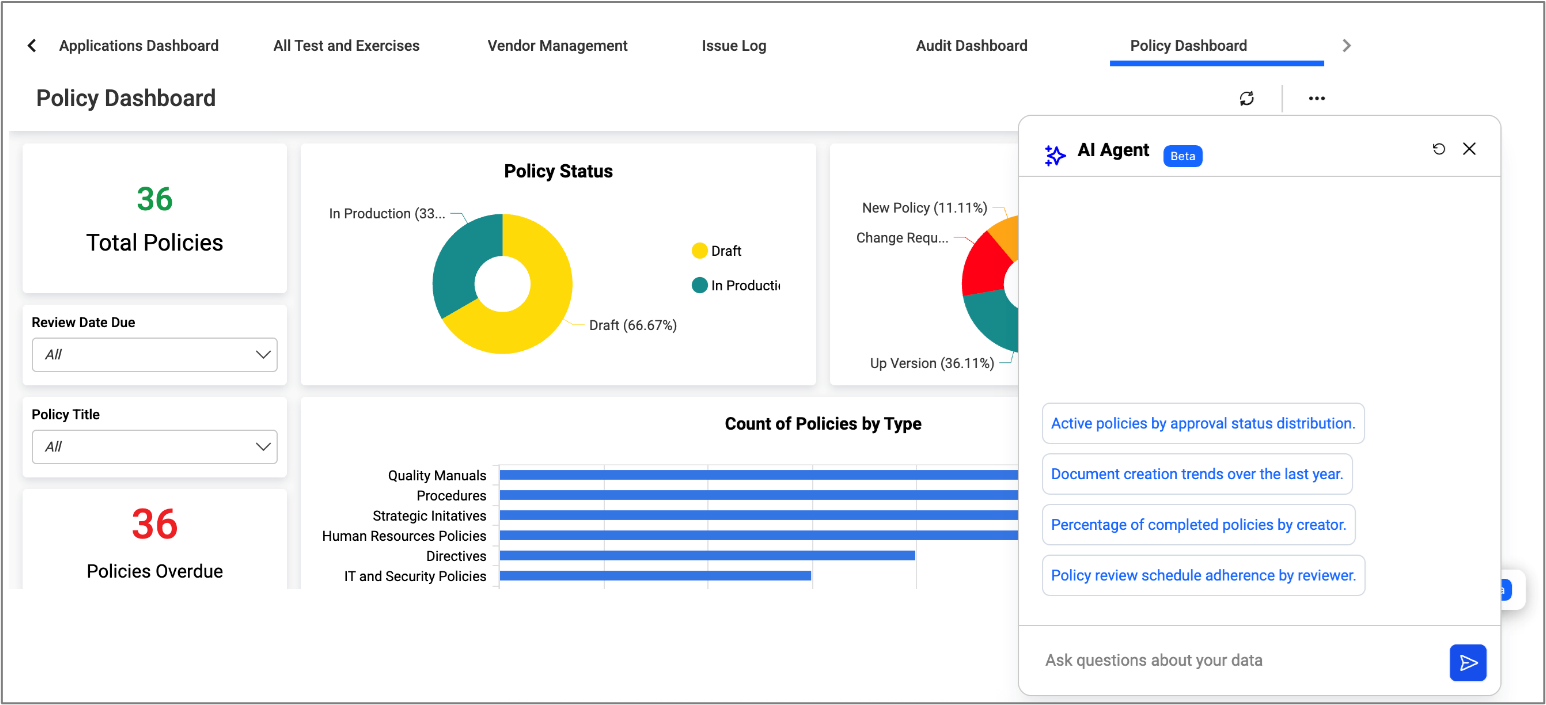
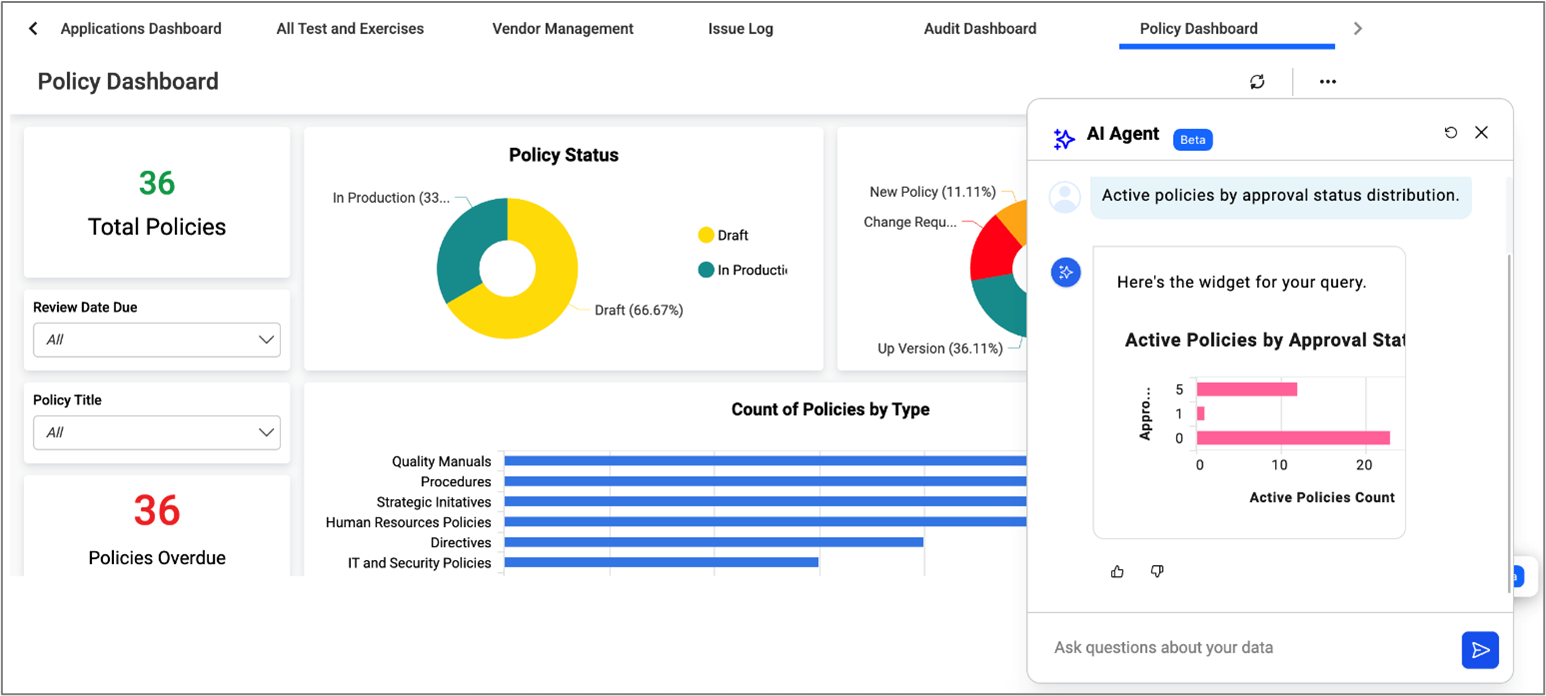
Specifically, the user can prompt CLDigital AI to pull in requested data points and automate building out the appropriate chart in the dashboard, as illustrated below.
1. CLDigital AI provides in-context, preset prompts based on the current screen (in this case, the Policy Dashboard):
2. The user can select one of the prompts (in this case, “Active policies by approval status …”) or provide their own prompt. CLDigital AI creates a widget with the relevant data that can be dragged onto the dashboard for reporting purposes:
Create Custom Forms and Reports From a Sample
GRC and BCM software typically include prebuilt reports for common requests (e.g. plan completion status, BIA results). However, there are also frequent demands for custom reports.
For example, an auditor might ask for a vendor risk assessment and provide a sample vendor survey that includes the specific content they want to see. You could use the Report Builder to pull together the required fields, or use CLDigital AI to expedite the process and create the form based on the sample, as outlined below:
- Import the sample document (in this case, a vendor survey example to gather the required data).
- CLDigital AI creates the survey with the required fields from the sample. These are dynamic fields linked to the client’s CLDigital 360 pick lists where applicable (e.g. a name field) or prepopulated with appropriate selection options (e.g. Vendor Criticality has options for Critical, High, Medium, Low).
- The form can then be modified as needed (e.g. decide which fields are mandatory, change the default response options, and so on).

Exercise Scenario Development
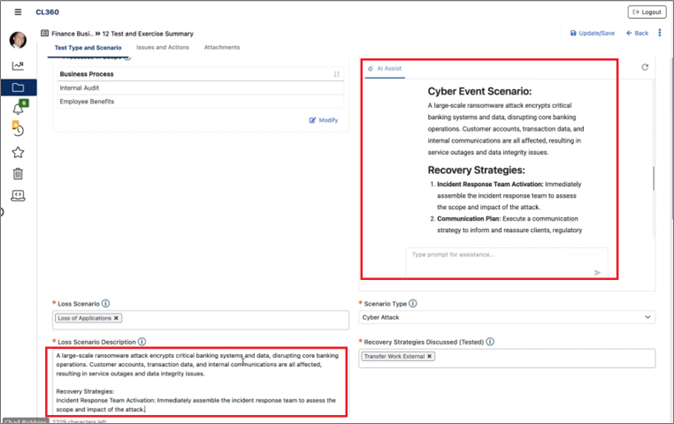
Generating exercise scenarios is another good fit for leveraging AI – in this case, to expedite the task of planning the test as well as to provide fresh scenarios as exercises often get a bit repetitive and stale over time.
The user still directs the scope of the exercise (e.g. a ransomware attack with a focus on business continuity strategies), and CLDigital AI generates the scenario details as illustrated below:
Measure Your Compliance With Standards and Regulatory Requirements
For GRC and BCM, there is no shortage of standards (e.g. ISO 31000, ISO 22301) and regulatory requirements (e.g. Operational Resilience in the financial sector). Relevant data can be pulled into prebuilt reports to satisfy audit requests. However, the report itself doesn’t necessarily validate compliance.
To address this gap, CLDigital AI has been preprogrammed with a library of standards and regulations that it can leverage to automate a review of your plans and data to measure compliance:
- Select the standard/regulation for which you want to measure compliance.
- CLDigital AI reviews your data to check for compliance.
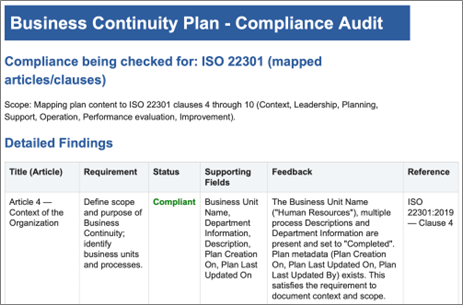
- CLDigital AI then generates a compliance score and a report summarizing compliance status and gaps.
In the example below, the user has requested a compliance check against ISO 22301. This produces a report with a compliance score and feedback for each ISO 22301 clause:
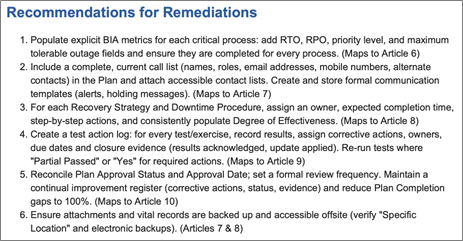
For gaps that are found, the report also provides recommendations to address those gaps as in the example below:
Addressing AI Security Concerns
GRC and BCM vendors have been cautious with their adoption of AI technology because of the sensitivity of the data hosted in this software. As with many GRC and BCM vendors, CLDigital addresses the security concern by providing the AI functionality within a closed environment. Customer data does not leave the client’s CLDigital 360 environment.
Customers can choose to integrate their own LLM with their CLDigital 360 instance to enhance the AI functionality. Queries to CLDigital AI can search your LLM for more context and provide more-refined responses. Even with this type of integration, it remains a closed environment.
Summary
While AI technology is growing exponentially, adoption is still in the early stages. Part of the challenge is understanding what is possible and what are the risks.
For organizations exploring GRC or BCM solutions, we recommend asking vendors about their existing AI functionality and AI product roadmap. For example, are vendors providing AI functionality to minimize time spent on mundane tasks (e.g. data gathering and reporting) to enable more time spent on gap analysis and plan optimization? Similarly, is there AI functionality to support analysis and planning (e.g. what-if modeling, exercise scenario development, and measuring compliance with industry standards)? Finally, how is the vendor ensuring your data remains secure?
CLDigital is a good example of a vendor that is actively integrating AI functionality into their solutions to improve the effort-to-value ratio for their clients.
Want to Know More?
Governance, Risk, and Compliance Research Center
Business Continuity Management (BCM) Software