As organizations accelerate their use of Microsoft’s Power BI and AI to modernize analytics, many are encountering challenges that limit scalability and value delivery. Complex licensing structures, diverse data systems, and rising regulatory demands make it difficult to deploy AI-driven analytics effectively.
Power BI, with its deep integration with Azure and enterprise-grade governance, is increasingly positioned as Microsoft’s AI-augmented business intelligence solution. However, without thoughtful implementation and role-specific enablement, organizations risk underutilizing Power BI’s AI capabilities or overspending on licenses that are not aligned to user or organizational needs.
To support your evaluation of Power BI, download our AI Solution Summary report for a full assessment, ROI calculator, case studies, and comparative analysis.
Info-Tech’s AI Solution Assessment
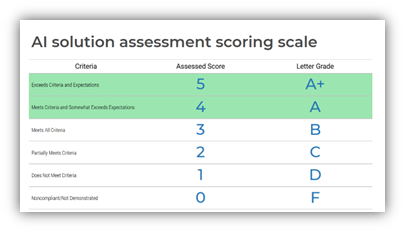
Our AI Solution Assessment evaluates Power BI and AI use cases across the solution development process. This analysis aims to provide a detailed and rapid overview of the AI capabilities offered within Power BI.
The specific use cases looked at within this report are:
- Smart Data Discovery
- Predictive Analytics & Forecasting
- Natural Language Querying & Narratives
- AI-Powered Visualizations
- Image Analytics and Integration
- AI-Driven Anomaly Detection
- Text & Sentiments Analytics
- Data Classifications and Sensitivity Labels
- Integrating Custom AI/ML
Info-Tech Insight
There’s no single formula for value creation when integrating Power BI with AI; the impact depends heavily on how each function leverages data. For instance, Finance teams use AI-driven models in Power BI to forecast revenue and detect anomalies, while Operations teams rely on predictive dashboards to anticipate supply chain risks. The effectiveness lies not in the tool itself but in how intelligently it’s aligned with business objectives.
AI-powered business intelligence for the modern workplace.
Power BI streamlines the journey from raw data to intelligent insights through automated models and natural language experiences. Organizations can explore data, uncover trends, and build predictive reports – all within a unified platform.
Unlike traditional analytics tools requiring complex code or multiple systems, Power BI embeds AI directly into user workflows. With features such as AutoML, text analytics, Power Query Editor, and advanced data modeling, Power BI empowers every user to build scalable, insight-driven solutions with ease.
This success relies on thoughtful rollout, role-specific enablement, and a clear vision for how AI should augment human analysis rather than replace it.
Redefining business intelligence with AI-driven Power BI capabilities.
Power BI, enhanced by Microsoft’s AI ecosystem, streamlines the entire analytics lifecycle, from data preparation to insight delivery, addressing today’s BI challenges with precision and agility.
- Data Preparation & Integration: Power BI enables users to connect, clean, and transform data from multiple sources through Power Query. AI-powered capabilities, including automated column detection, sentiment analysis, image tagging, and Azure Cognitive Services integrations, accelerate data preparation.
- Data Visualization & Reporting: Power BI offers an expansive library of interactive visualizations, maps, dashboards, and custom visuals. Smart visuals leverage AI to automatically detect relationships, patterns, correlations, and anomalies – reducing manual analysis effort and improving insight clarity.
- Advanced Analytics & AI Insights: With integrated machine learning models and natural language tools, Power BI brings predictive and prescriptive analytics to users – no deep coding experience required.
- Collaboration and Data-Driven Decision-Making: Teams can share dashboards, collaborate in real time, and embed content into Microsoft Teams or other applications. Metrics (Goals) and Copilot in Power BI use AI to summarize data, recommend visuals, and build reports conversationally to accelerate insight delivery across all roles.
Assessing ROI for Power BI and AI
ROI is the number one question decision-makers ask when considering Power BI or any AI workplace tool.
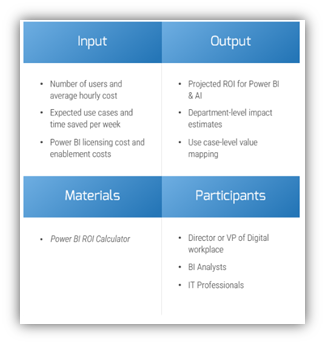
Use the Power BI & AI ROI Calculator to estimate the potential value of adopting Power BI across your organization. This tool can be used to evaluate time savings, cost efficiency, and productivity gains by department or role.
Info-Tech Insight
Power BI continues to deliver strong value through its robust data visualization and integration capabilities, enabling efficient reporting and performing tracking across business functions. However, adoption of advanced AI features such as predictive analytics, anomaly detection, and natural language insights remain limited due to licensing constraints. Broadening access to these capabilities could drive measurable gains in analytical depth and decision intelligence across the user base. We recommend piloting AI features with high-impact analytics teams before scaling organization-wide.