
Effectively Use SharePoint as Your ECM Solution
Structure your content for a successful user experience.
- Organizations have and generate overwhelming amounts of information, proliferating in a number of disparate systems.
- The new generation of content management systems is designed to personalize the user experience with great selections of features and add-ons. But choices mean understanding business goals and information requirements and carefully planning how this new powerful system will look and feel.
- Many content management teams assume they should just transfer folder structures and existing content into SharePoint, but getting maximum power out of SharePoint means moving away from folders and org chart-based silos and toward a meaningful user experience powered by good structures.
Our Advice
Critical Insight
- Information governance and information architecture are complex ideas to grasp and implement. They need time and special expertise at the table. A successful rollout of SharePoint depends on good, thought-out structures.
- SharePoint is primarily a business platform. It’s meant to be configured and maintained by business leaders who know their operations best, needing less dependency on IT. This transfer of responsibility and culture shift requires an effective training plan and the active presence of executive sponsors to help the business bridge that chasm.
- Include Teams in the plan. Microsoft's vision for its set of services means defining how SharePoint fits into the information landscape along with OneDrive and Teams. Look at the package deal to ensure all the services align.
Impact and Result
- The business leads decisions about structuring content.
- There is a standardized set of structures, rules, and practices for managing and growing content services in SharePoint.
- A management team of business information owners leads the structure and ongoing development of the content management system, supported by IT and SMEs.
- Users are informed and engaged, with clear instructions for interacting with SharePoint documents and guidelines for creating team sites.
- The organization understands its information communities and requirements.
- Project and governance leads understand concepts such as unstructured data and records.
Member Testimonials
After each Info-Tech experience, we ask our members to quantify the real-time savings, monetary impact, and project improvements our research helped them achieve. See our top member experiences for this blueprint and what our clients have to say.
9.6/10
Overall Impact
$31,240
Average $ Saved
21
Average Days Saved
Client
Experience
Impact
$ Saved
Days Saved
ANDRES Construction Services
Guided Implementation
10/10
$68,999
50
NIGERIA LNG LIMITED
Guided Implementation
8/10
$96,599
20
The experience was satisfactory, while the expertise provided was exceptional.
MAX Solutions
Guided Implementation
10/10
N/A
N/A
Andrea is a delight, deeply knowledgeable and supportive. Her experience in similar projects shines through and she has been incredibly helpful in ... Read More
Dodge County
Guided Implementation
9/10
$4,139
3
Andrea did an excellent job listening to and learning about our project. She came prepared and addressed all of our questions and uncertainties. It... Read More
Rare
Guided Implementation
10/10
$28,289
18
The City of Winchester
Guided Implementation
10/10
$13,600
10
The best: customer service and expertise of the Analyst greatly improved my confidence and understanding of the subject matter. I received ideas th... Read More
California Department of Social Services
Guided Implementation
9/10
N/A
20
Liked real work examples, presentation with tips/suggestions
Transpharmation Canada Ltd.
Guided Implementation
10/10
$5,000
5
Levitt-Safety
Guided Implementation
10/10
N/A
N/A
Andrea is very knowledgeable and patient. I look forward to our next call.
American Heart Association, Inc.
Workshop
10/10
N/A
50
The best part of our experience was working with Claudia, she has great knowledge of the subject that was covered for the workshop and a great atti... Read More
Wiginton Corporation
Guided Implementation
10/10
$2,055
10
Caribbean Public Health Agency
Guided Implementation
10/10
$54,800
20
His in-depth expertise and knowledge of SharePoint allowed us to make informed decisions, optimizing our SharePoint environment for our specific ne... Read More
Technical Safety BC
Guided Implementation
10/10
$50,000
20
About Info-Tech
Info-Tech Research Group is the world’s fastest-growing information technology research and advisory company, proudly serving over 30,000 IT professionals.
We produce unbiased and highly relevant research to help CIOs and IT leaders make strategic, timely, and well-informed decisions. We partner closely with IT teams to provide everything they need, from actionable tools to analyst guidance, ensuring they deliver measurable results for their organizations.
What Is a Blueprint?
A blueprint is designed to be a roadmap, containing a methodology and the tools and templates you need to solve your IT problems.
Each blueprint can be accompanied by a Guided Implementation that provides you access to our world-class analysts to help you get through the project.
Need Extra Help?
Speak With An Analyst
Get the help you need in this 3-phase advisory process. You'll receive multiple touchpoints with our researchers, all included in your membership.
Guided Implementation 1: SharePoint Governance
- Call 1: Scope SharePoint program and identify priorities and vision.
- Call 2: Identify stakeholders.
- Call 3: Review governance committee roles and makeup.
Guided Implementation 2: SharePoint Information Architecture
- Call 1: Understand information mapping and inventory activities.
- Call 2: Review use cases and information flows.
- Call 3: Review sample information architecture structures (e.g. metadata best practices, site structure, teams).
Guided Implementation 3: SharePoint Migration
- Call 1: Understand changes (e.g. features) and requirements.
- Call 2: Review content and site inventory.
- Call 3: Review migration plan.
Contributors
- Jessica Bontjes, Account Executive , Microsoft
- Ash Chaudhury, Collaboration and Voice Product Marketing Manager, Microsoft
- Sarah Cook, Lead Developer, 360 Insights
- Alex Garin, Enterprise Architect, BMO
- Rob Hoogkamp, Consultant, Capgemini
- Jon Horner, Partner, Technical Consultant – O365 with CSS Partner Enablement, Microsoft
- Anna Khloudeneva, SharePoint expert, Texodi
- Moustafa Refaat, Solution Architect, Loblaw Companies
- Jon Studsrud, Delivery Excellence Director, Microsoft
- Greg Zelfond, SharePoint expert, speaker, SharePoint Maven
- 6 anonymous contributors
 Right-Size the Governance Model for Your ECM Program
 Embrace Information Lifecycle Management in Your ECM Program
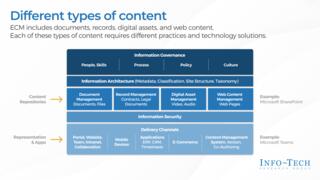 Develop an Enterprise Content Management Strategy and Roadmap
 Build a Digital Workspace Strategy
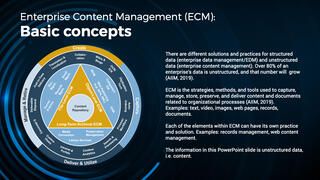 Effectively Use SharePoint as Your ECM Solution
 Implement a Content Curator Playbook
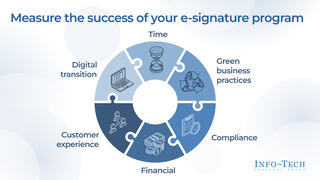 Adopting e-Signature
 Give Your Enterprise Content the Retail Experience: Use Retail Marketing Concepts to Design Intuitive ECM