
Move Email to the Cloud
Cloud-based email is the way of the future! It's also a whole heck of a lot less expensive than on-prem.
- Cloud solutions are becoming increasingly popular. Is it time to move email to the Cloud?
- What are the primary vendors in the cloud email space?
- Is cloud email really more cost-effective?
- What kinds of challenges do enterprises experience during a cloud email project?
Our Advice
Critical Insight
- Cloud email is the way of the future. You must have a strategy in place to either adopt it or not.
- Cloud email and on-prem solutions have similar TCO up to five years from a licensing perspective.
- Cloud email is always more cost effective when you consider support and power.
- There are two real choices for cloud email: Google Apps and Microsoft Office 365.They present similar challenges and benefits to users and IT departments.
Impact and Result
- Determine if cloud email is a viable option for your enterprise.
- Deliver a cost assessment of cloud email.
Member Testimonials
After each Info-Tech experience, we ask our members to quantify the real-time savings, monetary impact, and project improvements our research helped them achieve. See our top member experiences for this blueprint and what our clients have to say.
Client
Experience
Impact
$ Saved
Days Saved
Lehman College
Guided Implementation
10/10
$13,600
9
Jeremy provided expert, focused advice and knowledge. He is up-to-date with information, understood the complexities of our environment and took t... Read More
Town Of Marana
Guided Implementation
10/10
$54,400
23
Jeremy did a great job of ultimately answering the question of should we move email to the Cloud or not. He presented us with exercises that allow... Read More
Bapco
Guided Implementation
8/10
N/A
5

About Info-Tech
Info-Tech Research Group is the world’s fastest-growing information technology research and advisory company, proudly serving over 30,000 IT professionals.
We produce unbiased and highly relevant research to help CIOs and IT leaders make strategic, timely, and well-informed decisions. We partner closely with IT teams to provide everything they need, from actionable tools to analyst guidance, ensuring they deliver measurable results for their organizations.
What Is a Blueprint?
A blueprint is designed to be a roadmap, containing a methodology and the tools and templates you need to solve your IT problems.
Each blueprint can be accompanied by a Guided Implementation that provides you access to our world-class analysts to help you get through the project.
Contributors
Over 80 companies contributed to this research.
 Effectively Acquire Infrastructure Services
 Empower Your Business With a Proven Cloud Strategy
 Next-Generation InfraOps
 Create a Game Plan to Implement Cloud Backup the Right Way
 Build a Cloud Security Strategy
 Take Control of Cloud Costs on AWS
 Take Control of Cloud Costs on Microsoft Azure
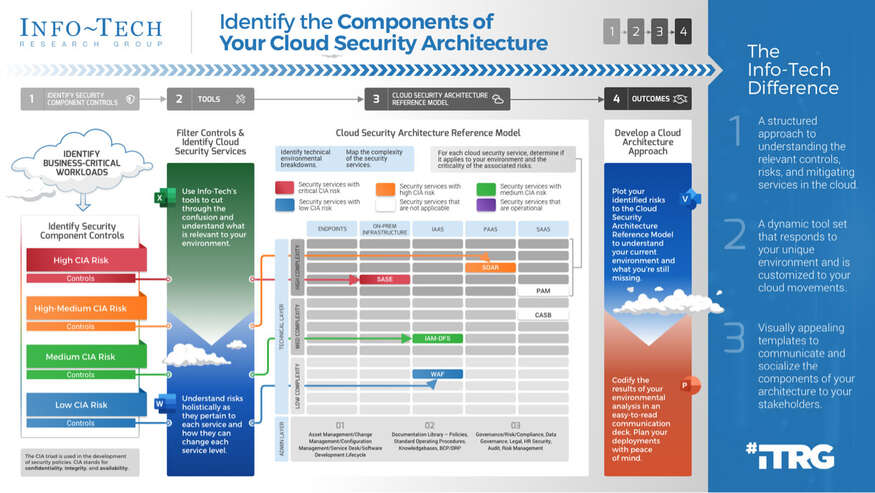 Identify the Components of Your Cloud Security Architecture
 Govern Microsoft 365
 Design Your Cloud Operations
 Passwordless Authentication
 Legacy Active Directory Environment
 Considerations for a Hub and Spoke Model When Deploying Infrastructure in the Cloud
 Get Started With FinOps
 Build a FinOps Strategy to Enable Dynamic Cloud Cost Management