
Extend SharePoint to Overcome Key Challenges
Third-party products for administration, content management, mobile, and social address common use-case challenges.
- SharePoint is widely deployed and can serve many functions, but its size challenges its optimal use.
- The potential uses of SharePoint make getting the most out of a deployment problematic. Many clients struggle with determining where they should begin.
- The variety of available vendors makes deciding on how to proceed difficult, even when the key problems of SharePoint are defined.
Our Advice
Critical Insight
- SharePoint 2010 has alleviated many of the core technical concerns with SharePoint 2007, but the problems of sprawl and user adoption remain.
- Successful SharePoint deployments utilize third-party vendors to mitigate its problems.
- Each deployment of SharePoint is unique and needs to be customized; however, the number of different solutions that are needed can be managed easily.
Impact and Result
- Define SharePoint’s most common challenges and the SharePoint functions that cause them.
- Understand the five most common issues: content management, workflow, administration, mobile, and social.
- Define the third-party vendors and their offerings in the context of each problem.

About Info-Tech
Info-Tech Research Group is the world’s fastest-growing information technology research and advisory company, proudly serving over 30,000 IT professionals.
We produce unbiased and highly relevant research to help CIOs and IT leaders make strategic, timely, and well-informed decisions. We partner closely with IT teams to provide everything they need, from actionable tools to analyst guidance, ensuring they deliver measurable results for their organizations.
What Is a Blueprint?
A blueprint is designed to be a roadmap, containing a methodology and the tools and templates you need to solve your IT problems.
Each blueprint can be accompanied by a Guided Implementation that provides you access to our world-class analysts to help you get through the project.
Contributors
- Alliance Pipeline
- Injured Workers Insurance Fund
- US Bureau of Reclamation
- Human Resources and Skills Development Canada
 Right-Size the Governance Model for Your ECM Program
 Embrace Information Lifecycle Management in Your ECM Program
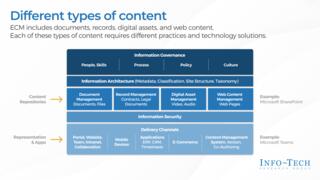 Develop an Enterprise Content Management Strategy and Roadmap
 Build a Digital Workspace Strategy
 Effectively Use SharePoint as Your ECM Solution
 Implement a Content Curator Playbook
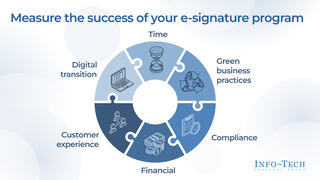 Adopting e-Signature
 Give Your Enterprise Content the Retail Experience: Use Retail Marketing Concepts to Design Intuitive ECM